

User Interface & Features Overview
ABELDent Local Plus and ABELDent Cloud share the same features,
data integrity measures and modern user interface.
Both options bring ease of use and whole practice benefits to a new level.
Data Protection
Enhanced Clinical Note Protection
- Lock and unlock notes in progress
- Sign completed notes to approve and lock them
Password Reset
- Increase security with complex passwords
- Maintain control with 6-month password updating
- Allows users to easily and securely reset a lost or forgotten password
Digital Signature
- Prevent third-party access to your practice database
- Protect against intruders running malicious software
Web-based Signature Capture
- Enable patients to sign your online forms, such as consents, protecting both the patient and the practice
Advanced Appointment Scheduling
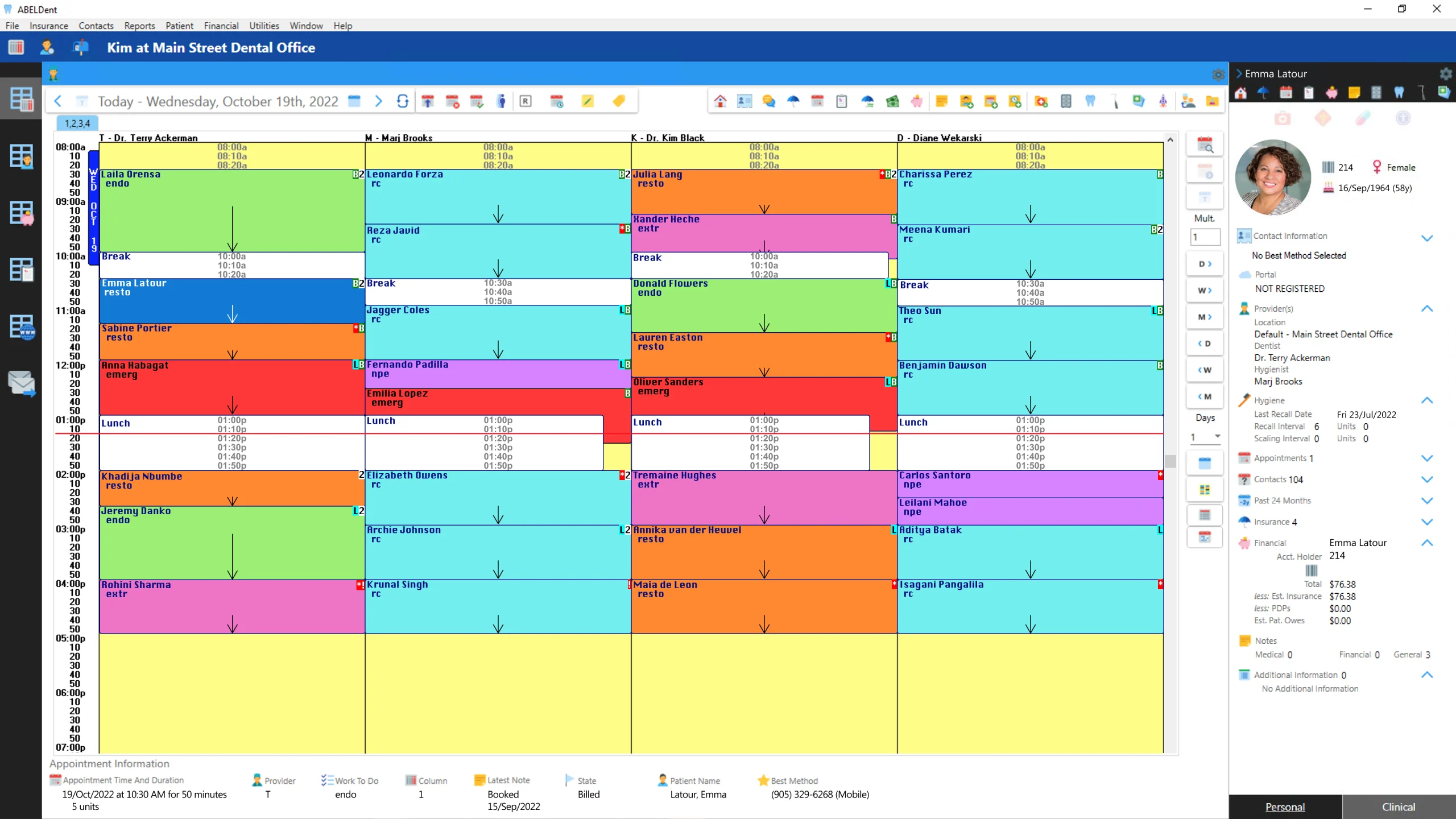
Appointment Scheduling
The administrative hub for a busy dental practice!
- Get single-step access from an appointment to all of the major patient workflows
- Choose flexible schedule views – a few columns for multiple days, multiple columns for a few days or any combination of columns and days
- Automatically track appointment history to help you identify patients that are chronically late, past no-shows or last-minute cancellations
- Allow patients to self-book appointments pending practice review and acceptance
- Focus view on the appointment type or appointment status
- Find openings that meet specific appointment needs
- View in privacy mode for high-traffic areas of the practice
Short Notice Booking
- Fill gaps in your schedule resulting from last-minute cancellations. Text or email patients who have opted in for a short-notice appointment and fill the opening with the first patient to confirm.
Automated Recall Booking
- Patients who are due/overdue for RC or SC appointments are automatically notified with templated messages to encourage them to book.
Unscheduled Appointment Messaging
- Book more of your planned treatment! Create a filtered view of the contacts in your Treatment Manager, then send them a templated message (email or SMS) to encourage appointment booking. Leverage your million-dollar filing cabinet.
Patient Self Booking
- Empower new patients to register on your website and book an appointment using the ABELDent appointment scheduler. Empower existing patients to log in and do the same. Retain full control of when patients can book, including which providers, days, times, and purpose. When an appointment is scheduled, it is clearly differentiated, allowing you to review, confirm, or remove it as required.
Financial
Online Payments
- Collect payments remotely from patients with outstanding balances. Patients can pay from their computer or phone using industry-standard payment options.
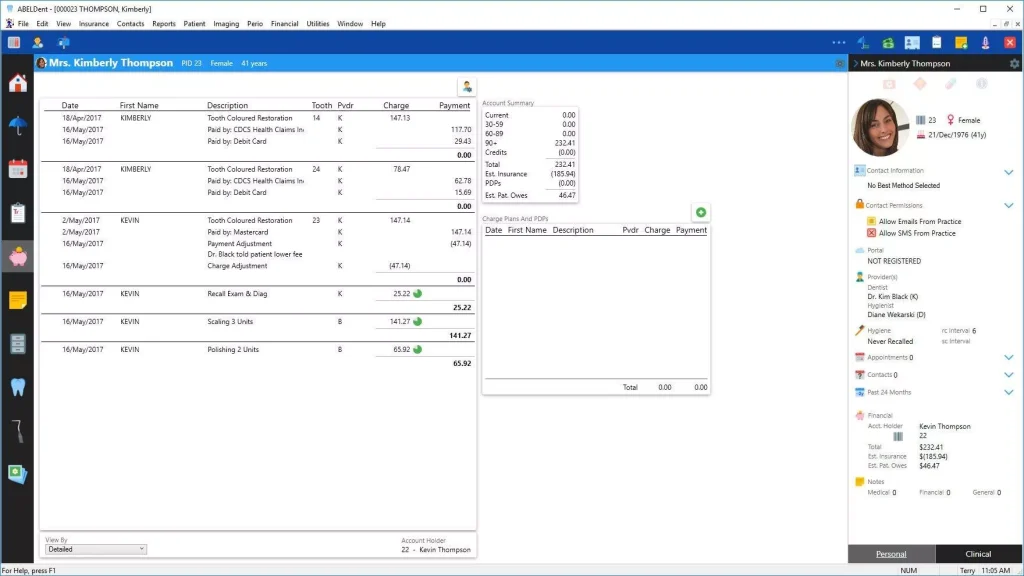
Financial Ledger
- View the financial ledger in chronological or open-item view
- See outstanding amounts owing, post-dated payments and amounts expected from insurance at a glance
- Create payment plans and charge plans in a few keystrokes
- Post insurance, personal and bulk payments
- Adjust expected insurance based on returned insurance information to collect patient portions more quickly
- Protect the integrity of your financial records
Treatment
- Enter completed treatment or drag planned treatment to bill it
- Enter planned treatment and organize into phases and appointments
- Create contacts to ensure that planned treatment is scheduled
- View expected insurance and expected patient portions
Receivables Manager
- Filter and display money, patients and carriers owed at any point in time
- Prioritize collection efforts using aging, carrier and other filters
- Get single-step access to financial, contact and all other patient information
- Record notes about collection efforts to ensure effective follow-up
- Send messages to prompt online payment
- Send Statements and Receipts to encourage patient payment
Patient Records and Navigation
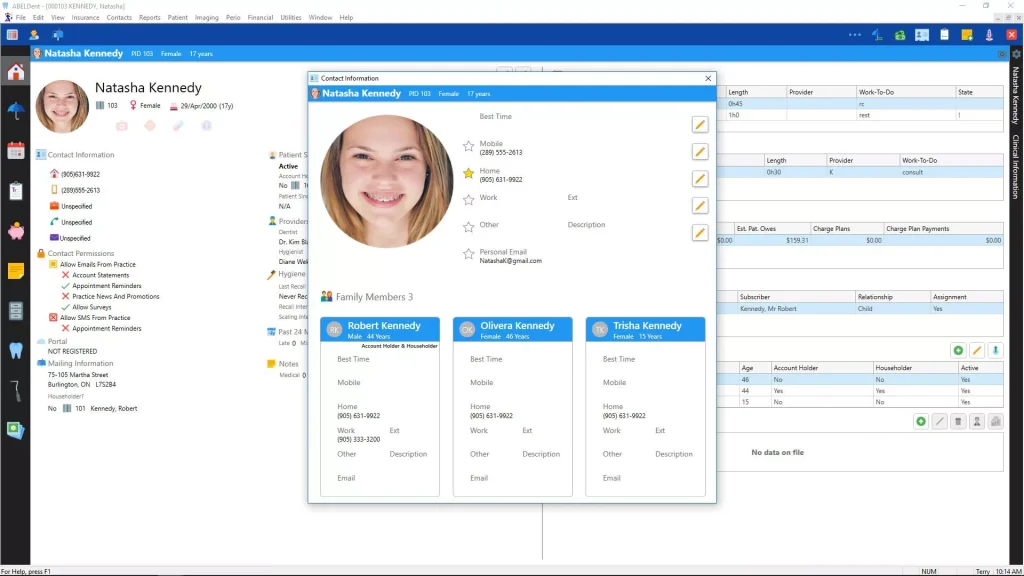
Patient Dashboard
- View a summary of the important information about a patient on one screen
- Enjoy easy access to keep patient information up to date
- Get easy access to records for a patient’s family members
- Customize to view personal or clinical data on the most important ABELDent screens
- Send and review Health History and other forms
- Update information for a patient and automatically update other family members
Personal and Clinical Sidebar
- View important patient information without leaving the screen you are on
- View Scheduler, Treatment Manager and Receivables Manager on all patient screens
- Customize to focus on personal or clinical information in each area
- Send forms and review the submitted result

Secure Custom Online Forms
- Save time during patient visits with online Health History forms
- Review Health History forms and add provider notes to complete the record
- Patients access forms online through a secure link sent to the patient
- Patients access, complete and submit the form into their patient record
- Submitted forms are stored in the patient’s record in ABELDent for review
- Create custom Dental History, Consent and other forms tailored to your practice needs
- ABELDent ensures all PHI (patient health information) is encrypted and secured to ensure safe data transmission
Patient Manager
- Track each patient’s visit from pre-arrival to departure
- Be aware of patient issues such as allergies, medications and medical issues
- Track how long patients have been waiting
- Prevent no-shows by reaching out via text
Charting and Clinical Record-keeping
Charting and Perio Charting
- Experience clinical and administrative synergies that are not possible with paper charts
- Customize your charting workflows for simplified clinical data capture
- Protects against billing errors through integrated billing and charting
- Visually appealing odontogram and periodontal chart
- Secure clinical notes with certification and built-in audit trails
- Build detailed progress notes quickly and accurately from customizable notes templates
- Supports voice-controlled periodontal charting
Direct Capture (Image Templates)
- Capture radiographs and other image types directly into ABELDent. Categorize them into meaningful templates for superior organization. Enhance images for viewing and mark up.
- Automatically capture radiographs into pre-set templates
- View and organize captured images
- Apply filters to images
- Capture intraoral images directly into ABELDent
- Optionally integrates with most third-party imaging software
Treatment Manager
- Make the most of your “million-dollar filing cabinet”
- View outstanding treatment for all patients
- Filter outstanding treatment by provider, period of time and other factors
- Facilitate contact with patients to schedule treatment
- View all patient and family scheduled appointments and unscheduled appointments
- Send automated reminders for overdue hygiene appointments
- Allow patients to self-book appointments
Treatment Status and Materials Mode
- Select a mode that assigns meaning to colours on your odontogram to display the state of procedures (e.g. planned, completed) or to display the material for restorations on the odontogram.
Electronic Claims
ITRANS Attachments
- Within our ITRANS mechanism, we support the association of attachments with claims, which have become increasingly mandatory for insurance coverage decisions, including many of the CDCP submissions.
EOB Automation
- Estimation of benefits results from ITRANS are automatically applied to insurance-expected amounts to determine accurate patient portion owing.
Eligibility Checks – US Version Only
- Verify a patient’s eligibility for insurance coverage in real time.
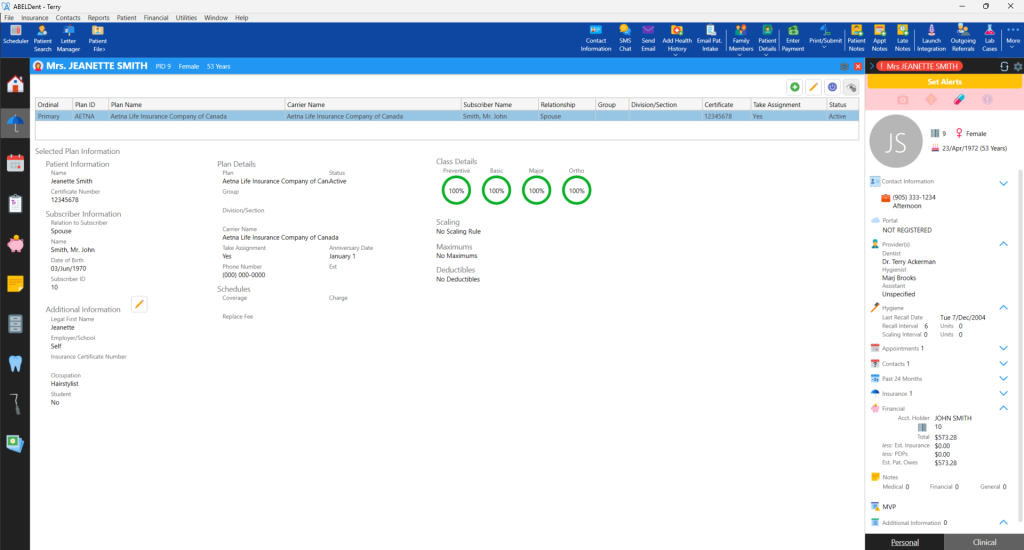
Managing a Patient’s Dental Insurance
- Encourage patients to accept treatment
- Store insurance information to assist patients
- Calculate estimated coverage
- Submit electronic claims and receive electronic responses
- Submit planned treatment
- Automate collection of patient portion
AI-enabled Functionality
ABELDent Scribe
- An AI-powered assistant that monitors patient interactions and suggests summarized Clinical Notes to save you time and effort. Convert your clinical conversations into structured notes that you review, edit and approve.
- Note creation is faster, more consistent, and more precise.
- Keep your patient information secure with HIPAA and PIPEDA compliance
AI Radiograph Analysis and Suggestions
- Integrates with Diagnocat for AI analysis of your digital images
- Identify conditions and suggest planned treatment.
- Generates reports, including reports that can be shared with patients.
- (Coming Soon) The information generated, after your review and acceptance, will populate your ABELDent odontogram
Patient Communication
Broadcast Messaging
- Send templated emails, such as holiday greetings, weather-based closure notifications, or announcements about new providers, to your active patients.
ABELDent PCS (Patient & Cloud Services)
- ABELDent PCS is the only patient communication system designed for, and fully integrated with, ABELDent Local Plus and ABELDent Cloud.
- With a competitive and growing list of capabilities, superior integration, and protection against third-party data issues, PCS is the preferred patient communication solution for ABELDent Local Plus and Cloud users.
- No separate software. Nothing more to load. No extra monthly payment. Just strong, modern communication built right into ABELDent software.
Value-Added Services
The following value-added services complement both ABELDent Cloud and ABELDent Local Plus in bringing security, growth and prosperity to your practice.
Reporting and Analytics
- Analyzing your dental practice’s data is one of the most powerful ways for you to identify opportunities to improve your practice. ABELDent R&A makes it easy for you to measure your practice’s performance and make data-driven decisions that improve patient care and increase your practice’s bottom line.
- Bridge the gap between data and decision-making. ABELDent R&A visualizes your practice data using intuitive and interactive dashboards containing easy-to-understand charts and diagrams. See the big picture or drill down into the details. Cloud-based and highly secure, ABELDent R&A provides the information you need to grow your practice.
Reputation Management
Acquire, Monitor and Showcase Positive Customer Reviews using ABELDent RMS
How does it work?
- View in ABELDent the list of patients you treated today. Select the patients you wish to email or text a review request.
- Drive patients to leave positive reviews on popular review websites, such as Google, Facebook, RateMDS, and more.
- Monitor, screen, and respond to unhappy patient reviews in real time.
- Access your reviews anytime and watch your ratings and search results soar!
- Provide access to your reviews from your website and/or social media channels and build your reputation.
Remote Backup and Recovery
ABELDent RBR regularly and automatically backs up your data on secure cloud servers.
- If you change your server, ABELDent RBR’s patented process identifies the new server and notifies you to adjust your backup accordingly. Other solutions may miss the change and back up the wrong or no data! ABELDent’s unmatched expertise with ABELDent software and data allows us to help you recover from disasters faster than with other backup solutions. ABELDent will provide you with a temporary virtual server, where required, to get you operational when there is no other better and faster option to do so.
ABELDent RBR regularly and automatically backs up your data on secure cloud servers.
Already an ABELDent customer?
Purchase ABELDent RBR on MyABEL